




Hotbar Slot Button resource pack
Download Download
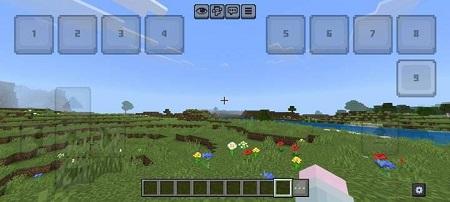
The Hotbar Slot Button resource pack for Minecraft PE (Bedrock) solves a common issue faced by players on mobile devices: the difficulty of reaching distant hotbar slots on small screens. This pack adds nine dedicated on-screen buttons, each linked to a specific hotbar slot, allowing you to switch items instantly without tapping the hotbar itself.
Key Features
This resource pack is especially valuable for PvP players who often lose precious seconds while switching between weapons, food, and utility items. The buttons are placed in an accessible area of the screen, and each one corresponds directly to a numbered slot — Button 1 selects Slot 1, Button 2 selects Slot 2, and so on up to Slot 9.
This layout provides full, fast, and precise control over your inventory without physically touching the hotbar.
Two-Finger Mode and Real Gameplay Benefits
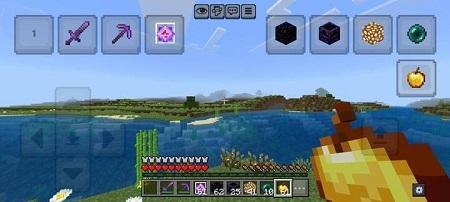
One of the strongest advantages of this pack is its support for two-finger control, which dramatically improves gameplay fluidity on mobile devices.
Continuous Action
For example, imagine mining stone with a pickaxe and suddenly hitting gravel. Normally, you’d stop, lift your finger, switch to a shovel, and resume digging. With this resource pack, your second finger simply taps the corresponding button, instantly changes your tool, and lets you continue mining without interruption.
This seamless interaction provides a significant advantage during fast-paced moments such as PvP combat, mob encounters, or quick resource gathering.
Customization and Built-In Editor
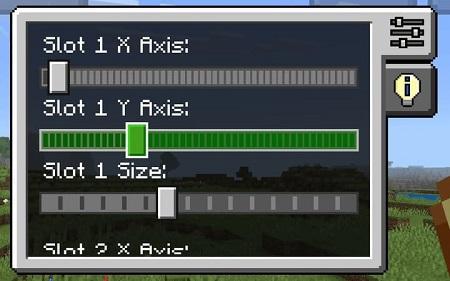
The pack includes an integrated editor that allows you to adjust the size and position of each button to match your personal preferences and screen dimensions.
Editing Panel
To open the editing panel, tap the gear icon located in the bottom-right corner of the screen. The panel provides sliders for adjusting:
- X-axis position
- Y-axis position
- Button size
Due to JSON UI limitations, these settings do not save automatically when restarting the game. To keep your layout permanently, the pack includes a special panel displaying the slider values. You can copy these values manually into the _global_variables.json file to preserve your configuration.



I didn’t download yet??
Best
Thank you