



Footprints Particle texture pack
Download Download
The Footprints Particle texture pack introduces a simple yet immersive visual detail to Minecraft PE — visible footprints that appear behind your character as you walk. Each step leaves a short-lived particle imprint on the ground, adding atmosphere without cluttering the world.
Key Features
• Player-Exclusive Footprints
The pack generates footprints only for the player, ensuring the effect remains visually clean and does not overwhelm the environment with unnecessary particle spam.
• Particle-Based Trail System
Footprints appear exactly where your character steps and fade away after a few seconds. This temporary effect keeps exploration atmospheric while preventing the world from being filled with permanent marks.
• Modified Player Entity & Animations
The pack updates the player entity file and walking animation to support the footprint system. Because of this, it may conflict with other resource packs that change character animations.
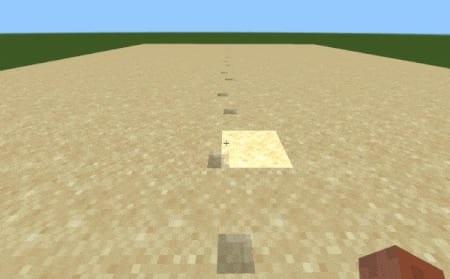
Realistic Movement Effects
The texture pack is designed to behave logically depending on how and where you move.
Smart Footprint Detection
Footprints are generated only under specific conditions:
- appear when walking or running on solid ground
- do not appear in water
- do not appear while flying in Creative mode or gliding with elytra
- do not appear on lava surfaces
This ensures the feature looks natural and never breaks immersion.
Temporary Traces
Each footprint fades out after a short duration. This prevents long paths, bases, or mining sites from becoming visually overcrowded with particle marks. The effect stays subtle and atmospheric.
Compatibility and Usage Modes
The pack provides two operation modes to ensure maximum flexibility.
Two Available Modes
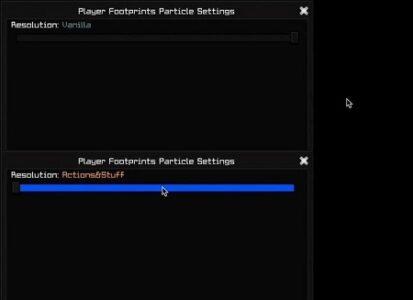
1.Standalone Vanilla Mode
Works independently and simply adds footprints without additional animations.
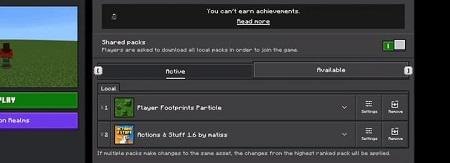
2.Compatible Mode for “Actions & Stuff”
If you use the “Actions & Stuff” animation pack, Footprints Particle can work alongside it.
In this case, make sure Footprints Particle is placed above other animation packs in the resource pack list.
Compatibility Warning
Because the pack modifies player animations and the player entity file, it may conflict with other addons that edit the same components. If footprints fail to appear or animations look incorrect, try adjusting the order of packs or temporarily disabling others affecting the character model.
Enhanced Atmosphere and Immersion
Small visual effects can significantly improve the game’s overall feel — and this pack proves it.
Visual Feedback in Exploration
Footprints help track your recent path, which is especially useful in caves, labyrinths, or large structures. In snowy or sandy biomes, the effect blends in naturally, adding depth and realism to the environment.
Cinematic Appeal
For players who enjoy recording videos or capturing screenshots, the pack adds motion and life to your scenes. Trails of footprints make character movement more expressive, giving gameplay footage a more dynamic and cinematic touch.